

TM 10-8145-222-23
MAINTAINER MAINTENANCE
BATTERY BOX
(MTRCS02 ONLY)
REPLACE, REPAIR
INITIAL SETUP:
Tools and Special Tools
References
SATS (WP 0096, Table 2, Item 8)
TM 10-8415-222-10
Materials/Parts
TM 10-8145-222-23P
Lock Washer, #10 ID (WP 0111, Item 11)
Equipment Condition
Tie Wrap (WP 0097, Item 55)
Refrigeration unit shut down (TM 10-8415-222-10)
Personnel Required
External power cables disconnected (TM 10-8415-
222-10)
Quartermaster and Chemical Equipment Repairer
REPLACE
1. Remove battery (WP 0053, Remove).
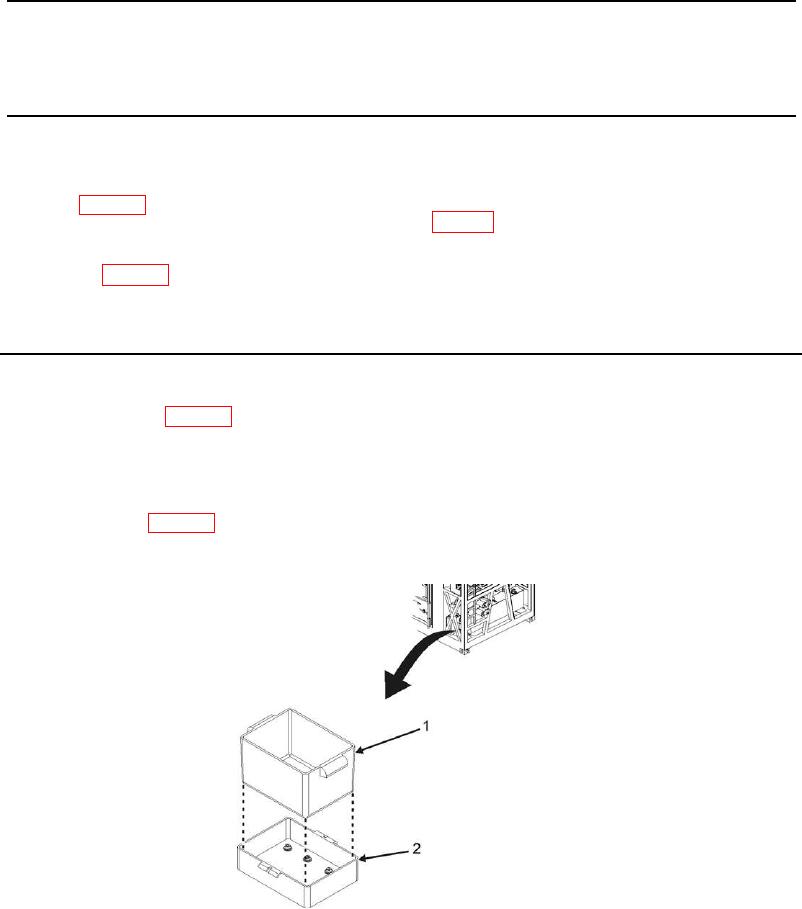
2. Remove battery box (Figure 1, Item 1) from battery pan (Figure 1, Item 2) by lifting out of pan.
3. Install battery box (Figure 1, Item 1) into battery pan (Figure 1, Item 2).
4. Install battery (WP 0053, Install).
5. Place MTRCS back into desired mode of operation (TM 10-8415-222-10, Operating Procedures).
Figure 1. Battery Box.
END OF TASK