

TM 10-8145-222-23
0043
REPLACE CONTINUED
Install
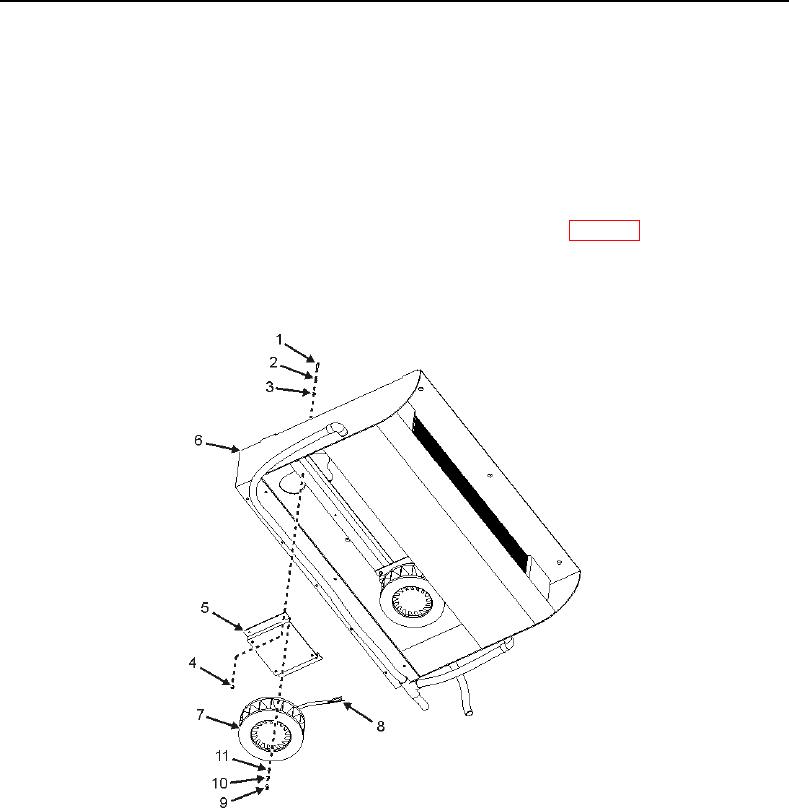
1. Install new blower motor (Figure 4, Item 7) onto mount bracket (Figure 4, Item 5) and secure with four screws
(Figure 4, Item 9), washers (Figure 4, Item 10), and new lock washers (Figure 4, Item 11).
2. Reconnect wiring (Figure 4, Item 8) to blower motor (Figure 4, Item 7) as tagged.
3. Attach blower motor mount bracket (Figure 4, Item 5), with blower motor (Figure 4, Item 7) attached, to
evaporator (Figure 4, Item 6) and secure with four screws (Figure 4, Item 1), washers (Figure 4, Item 2), new
lock washers (Figure 4, Item 3), and nuts (Figure 4, Item 4). Tighten hardware (WP 0091).
Figure 4. Evaporator Blower Motor Installation.