

TM 10-8145-222-23
0051
REPLACE CONTINUED
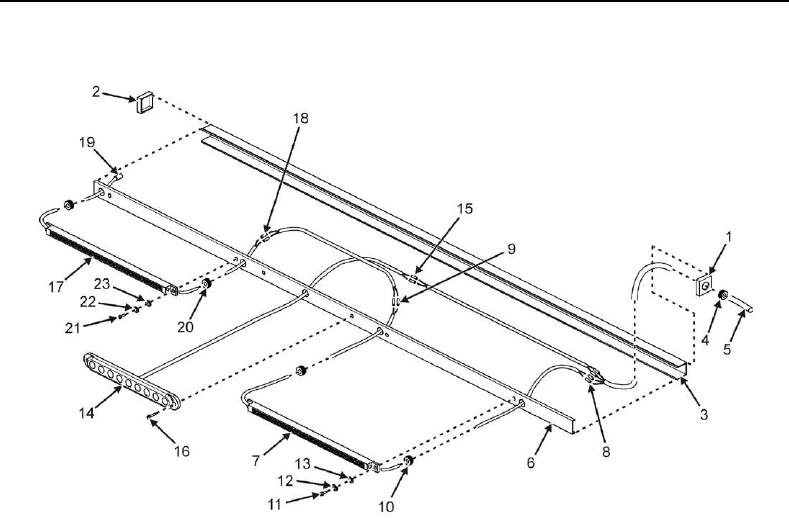
Figure 6. Removal of White LT4 Light Strip.
NOTE
When cutting splices, always cut wires as close to the splice as possible in order to
leave as much wire left as possible for re-splicing.
4. Remove tie wraps as needed to gain access to light strip splice points.
5. On forward end of white LED light strip LT4 (Figure 6, Item 17), tag and then cut one blue wire from one white
wire directly behind splice (Figure 6, Item 18). Discard splice.
6. Tag and then cut one brown wire from one white wire directly behind splice (Figure 6, Item 18). Discard splice.
7. On aft end of white LED light strip LT4 (Figure 6, Item 17), cut insulation sleeve and splice (Figure 6, Item 19)
from wire. Discard splice.
8. Pull two grommets (Figure 6, Item 20) out of multi-light assembly cover (Figure 6, Item 6) and slide up light strip
harness.
9. Remove two screws (Figure 6, Item 21), lock washers (Figure 6, Item 22), and washers (Figure 6, Item 23)
securing white LED light strip LT4 (Figure 6, Item 17) to multi-light assembly cover (Figure 6, Item 6).
10. Pull wires through cutout in multi-light assembly cover (Figure 6, Item 6) and remove white LED light strip LT4
(Figure 6, Item 17) from multi-light assembly cover (Figure 6, Item 6).